 BedrockMap
Open source · AGPL-3.0 · Windows 10
BedrockMap
Map editor for Minecraft Bedrock Edition
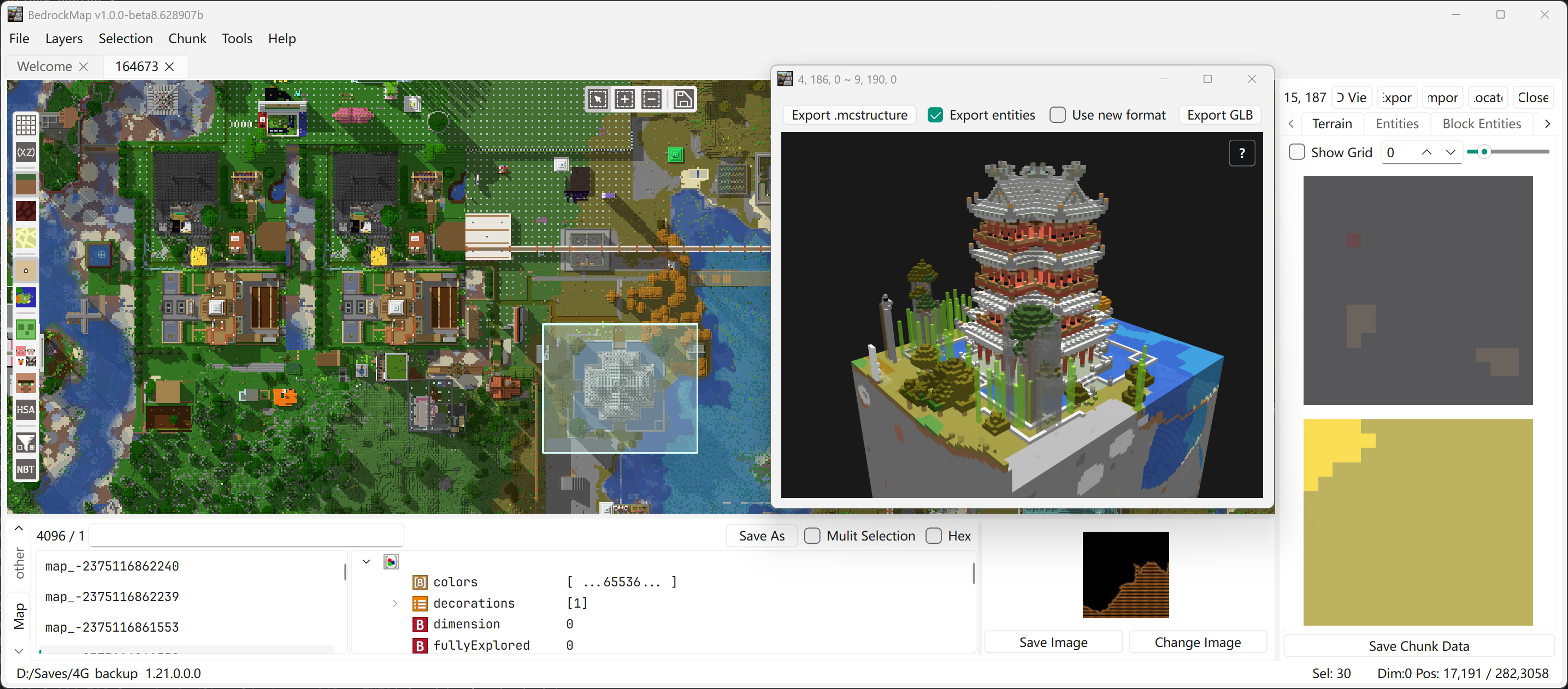
An open-source map editor built with Qt6 and C++17. It reads and writes LevelDB world saves directly, letting you browse, inspect and edit every chunk of a Bedrock world.
Supports Bedrock 1.2 – 1.21 worlds · No installer, just unpack and run
Features
World browsing
Open and explore every chunk of the Overworld, Nether, The End and custom dimensions.
Terrain visualization
Biome maps and terrain overlays, with configurable rendering filters.
Chunk editor
Select, inspect and delete chunks, and visualize the entities, block entities and pending ticks inside them.
Chunk copy & paste
Copy a selected region into another world — even across saves — with interactive placement.
NBT editor
View and modify NBT data, including level.dat, player inventories, villages, map items and more.
mcstructure support
Browse and edit .mcstructure files with a 3D voxel preview, export selections as mcstructure or GLB, or import structures into a world.
Key shortcuts
Once a world is open, drag the world folder or a save file onto the window to begin.
Mouse
| Left drag | Pan the map |
|---|---|
| Right click | Open the context menu |
| Middle drag | Select a region |
| Scroll | Zoom |
Keyboard
| Ctrl+O | Open a world |
|---|---|
| Ctrl+Shift+O | Open a file (.mcstructure / .nbt / .nbts) |
| Ctrl+C / Ctrl+V | Copy / paste the selection (works across worlds) |
| Ctrl+E / Ctrl+I | Export / import the selection |
| Ctrl+D | Delete selected chunks |
| Ctrl+H | Open the 3D voxel view |
| Ctrl+G | Go to coordinates |
| Alt+1 – Alt+4 | Switch dimension (Overworld / Nether / The End / custom) |
Start editing your world
Download the latest release and open your world folder to see the whole map.